How does a step challenge work in Jolt Club? One person creates a challenge and picks what counts, from steps to gym days. Friends join with one link or a 6-letter code. Steps and workouts then sync on their own from Apple Health or Health Connect, everyone races on one live leaderboard, and each day is finalized overnight, so nobody has to check in.
Key takeaways
- There are 8 challenge types: steps, distance, active minutes, calories, workouts, gym sessions, gym days and custom points.
- Challenges run for 7, 14 or 30 days, or any length from 3 to 365 days, solo or as two teams.
- Activity syncs automatically from Apple Health (iPhone) and Health Connect (Android), and a nightly sweep makes each day count even if you never open the app.
- Ties are shown as ties, and you can see the activity behind every score.
- Challenges are invite-only. There are no ads and no money pots, and joining and chat are free.
On this page
How does a Jolt Club challenge work, from start to finish?
A Jolt Club challenge has five stages: create it, invite friends, let activity sync, compete on the live leaderboard, and celebrate the results. The host does about a minute of setup. After that, each person’s phone or watch does the counting.
Create
Pick what counts, the length and the start date. Race solo or as two teams.
Invite
Share one link or a 6-letter code. Friends on iPhone and Android join the same challenge.
Sync
Steps and workouts flow in from Apple Health or Health Connect. No check-ins.
Compete
Watch the rankings move, cheer activities and talk trash in the chat.
Results
Each day is finalized overnight. When the last day closes, the winner gets a share card.
If you’ve never run one before, our guide on how to start a walking challenge with friends covers the rules to agree on before day one.
What can you compete on in a step challenge app?
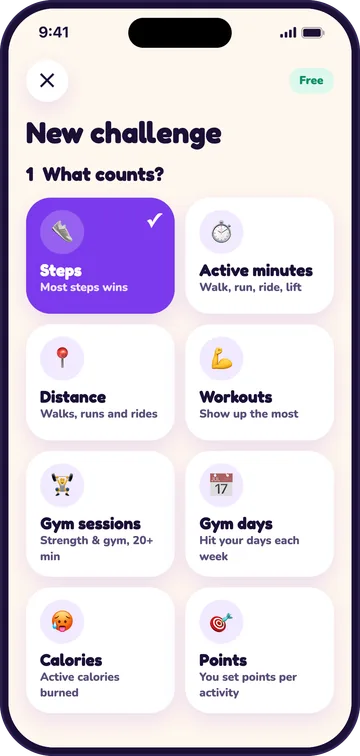
Jolt Club has 8 challenge types, so a walking challenge, a running race and a gym challenge all fit in one app. The host picks one type per challenge when creating it. Anything that reaches your phone’s health app counts toward it.
| Type | What scores |
|---|---|
| Steps | Steps per day. Most steps wins. |
| Distance | Walks, runs and rides, in miles or kilometers. |
| Active minutes | Minutes of exercise from your phone or watch, plus minutes you add. |
| Calories | Active calories burned (not calories eaten). |
| Workouts | Workouts of any type that last 10 minutes or more. |
| Gym sessions | Gym or strength workouts of 20 minutes or more. |
| Gym days | Days with a 20+ minute gym workout, up to a weekly goal of 2 to 5 that the host sets. |
| Points | The host sets points per activity type and per full 10,000 steps a day. |
Solo or a two-team challenge
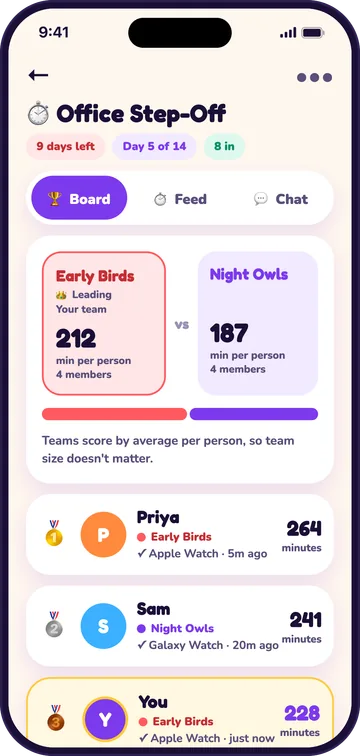
Every type works solo or as a team challenge with two teams. The host names the teams when creating the challenge and can rename them later. Teams score by the average per member, so a team of three can beat a team of five. That makes uneven teams fair, which matters most in an office or workplace challenge where departments differ in size. Our workplace step challenge guide covers the rest of the office setup.
Gym days: consistency beats volume
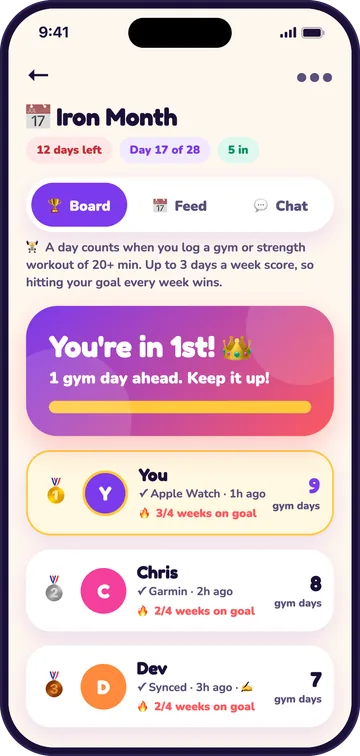
Gym days is the type for building a habit. A day counts when you log a gym or strength workout of 20 minutes or more, and only up to the host’s weekly goal scores. With a goal of 3, training seven days a week scores no more than training three, so hitting your goal every week is the top score. Gym sessions is the other way round: two sessions in one day count twice.
How long, and when it starts
Pick 7, 14 or 30 days, or set a custom length from 3 to 365 days. A challenge can start today, tomorrow, or on a date you pick up to 60 days ahead. Today is the default, and the whole day counts, so steps walked that morning still count for everyone who joins. The host can move the start date of a challenge that hasn’t started yet. Need a format? We collected 14 step challenge ideas matched to the groups they suit.
How do you invite friends to a challenge?
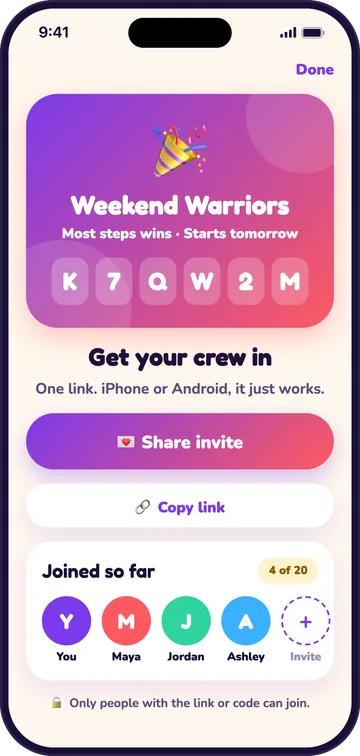
To invite friends, share the challenge’s link (joltclub.app/join/ plus its code) or its 6-letter code by text, WhatsApp or any app. Every challenge is invite-only, so only people with the link or code can join. iPhone and Android friends join the same challenge and the same group step challenge leaderboard.
Tapping the link shows the challenge before anyone signs up, so friends know what they’re joining. New friends join on the first setup screen, and the invite is kept through sign-up. The host can remove a member at any time.
How does activity sync from Apple Health and Health Connect?
Jolt Club reads steps, distance, active minutes, active calories and workouts from Apple Health on iPhone and Health Connect on Android, then syncs them to the challenge automatically. You grant access once during setup. Each sync shows when it happened (“synced 2 minutes ago”), so nobody wonders whether a score is current.
Anything that writes to those stores counts. On iPhone that means the phone itself, an Apple Watch and other apps that share with the Health app. On Android it means Samsung Health, Google Fit, Fitbit and any other app that writes there. Jolt Club doesn’t connect to Garmin or Fitbit directly; their data arrives through those two stores. Apple explains which apps can read your data in Share your data in Health on iPhone, and Google covers setup in its Android Help guide.
The part most apps skip: a nightly server sweep finalizes each day. Your day lands on the board even if you never open the app, which fixes the most common complaint we found when we read 511 two- and three-star App Store reviews of 10 challenge apps in November 2026: steps that were late, missing, or only counted after opening the app.
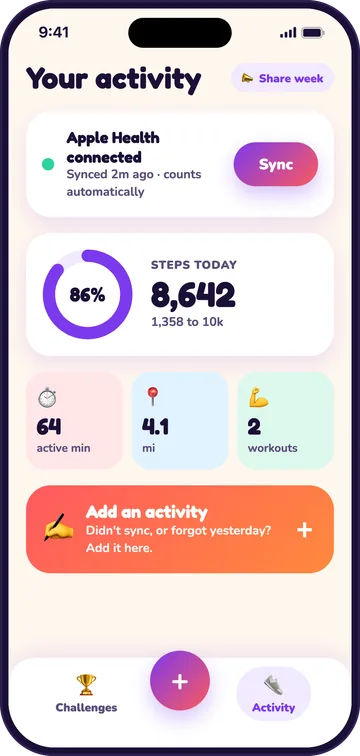
Can you add an activity by hand?
Yes. If your watch was on the charger or a workout didn’t sync, add it by hand: walk, run, ride, hike, gym, yoga, swim or other. You can add it for today or for any past day in the challenge, and attach an optional photo from the camera or your gallery. Photos are never required.
A manual walk, run or hike without a step count gets an estimated one: about 2,000 steps a mile for walking, 1,600 a mile for running, or an estimate from the minutes if you didn’t enter a distance. Estimated steps are labelled “est.”, and manual entries are marked, so the group can always see where a number came from.
How does the live leaderboard keep score?
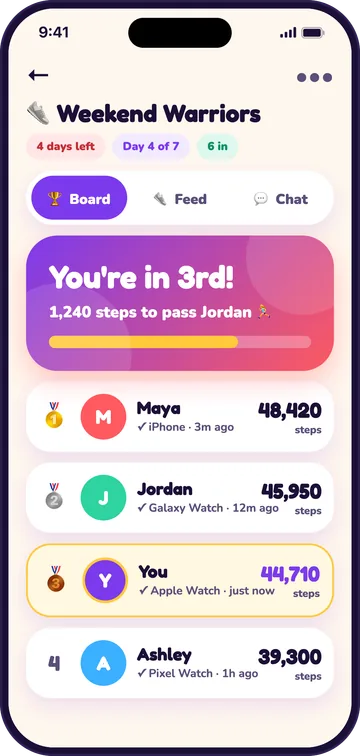
The leaderboard ranks everyone live as activity syncs, with each person’s total, their data source and how long ago they synced. A card at the top shows your rank and the gap to the person ahead, such as “1,240 steps to pass Jordan”. When two people have the same score, they share the rank: ties stay ties.
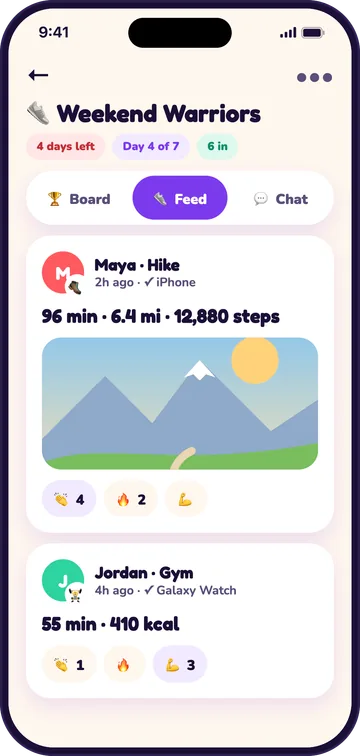
Behind every score is the activity that made it. The challenge feed lists each walk, run, ride or gym session with its source, and anyone can tap a cheer (an emoji reaction) on it. That transparency is the point of a step challenge app with a leaderboard: when everyone can see the activity, nobody has to argue about the totals.
When the challenge ends, the last day is finalized like any other, the winner is celebrated in the app, and anyone can share the result as a card. Results also post to the challenge chat, so a win becomes a moment the whole group can cheer.
What keeps a fitness challenge with friends going after week one?
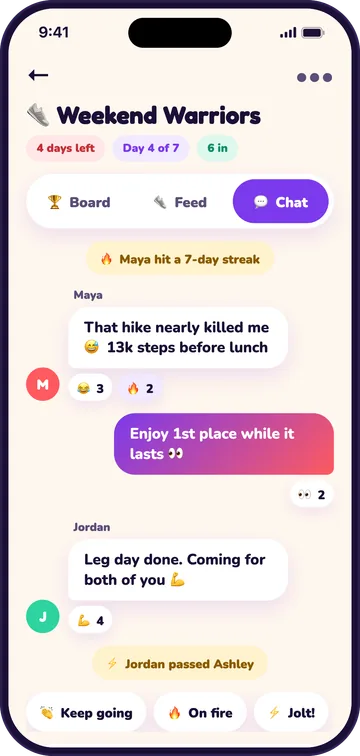
Social features keep a fitness challenge with friends going once the novelty wears off. Every challenge has its own chat with emoji reactions. Push notifications cover a friend joining, new chat messages, the standings, the results and a weekly recap, and you can switch each one off in Settings.
Streaks and badges
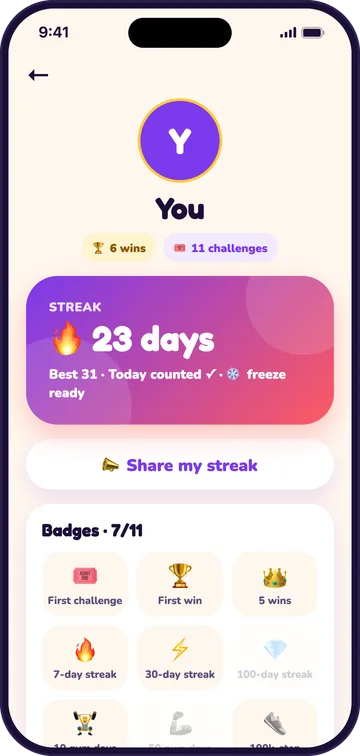
Your streak grows on any day with a workout of 10 minutes or more, 20 active minutes or 5,000 steps. One missed day a week is frozen automatically, so a sick day doesn’t wipe out a month. You also earn badges for firsts, wins, streaks and big weeks. Streak milestones post to your challenge chats for friends to cheer. For a gentle way to build one, try our 30-day walking challenge plan.
Profiles and share cards
Tap anyone on the board to see their profile: streak, recent days, wins and badges. Profiles are visible only to people who share a challenge with you. Share cards turn a streak, your week or a win into an image for stories or the group chat, and the share carries your invite, so a brag can bring in a new player.
Is there a home screen widget?
Yes. Jolt Club has home screen widgets on iPhone (small and medium, plus a lock screen widget) and on Android (small and medium). Each shows your rank, the gap to the person ahead, today’s value and the days left. Tap the widget to open the challenge. Apple’s guide to adding widgets on iPhone and Google’s guide to adding widgets on Android show where to find them.
Who can see my activity, and how do I stay safe?
Only the people in your challenges can see your activity and profile. You sign in with Apple on iPhone, or with an email address on either platform. Challenges are invite-only, with no public challenges and no strangers’ feeds. Anyone can block or report another member, and the host can remove members. There are no ads anywhere in the app.
What makes Jolt Club different from other challenge apps?
Jolt Club is built around fair scoring for a private group: automatic sync with a nightly finalize, visible sources and tied ranks. The table compares it with the problems we saw most in other apps’ reviews. For a wider look at the options, read our honest roundup of fitness challenge apps.
| Common problem | How Jolt Club handles it |
|---|---|
| Steps only count if you open the app | Background sync plus a nightly sweep that finalizes every day |
| Only steps count, so lifters and cyclists lose | 8 challenge types, including gym days, calories and custom points |
| Daily photo check-ins or you lose the day | No check-ins; photos are optional |
| Forgot your watch and the day is gone | Add an activity by hand for any day in the challenge, marked as manual |
| Strangers in private challenges | Invite-only; hosts remove members; block and report |
| Bigger teams always win | Teams score by average per member |
| Ads, or cash pots that turn friends into rivals | No ads and no money pots; joining and chat are free |
Where Jolt Club isn’t the best fit
Jolt Club isn’t for everyone. It has no public challenges or global leaderboards, so it won’t help you race strangers. It has no cash stakes, so if money on the line is what motivates you, a betting app suits you better. Garmin and Fitbit data only arrives through your phone’s health store, and Fitbit doesn’t write to Apple Health on iPhone. And it isn’t in the App Store or Google Play yet: it’s coming soon.
Frequently asked questions
How does a step challenge work for a group of friends?
A step challenge is a friendly competition over a set number of days. Each person’s phone or watch counts their steps, and everyone is ranked on a shared leaderboard. In Jolt Club the host picks the type and length, friends join with a link, and steps sync from each person’s phone or watch.
Do I have to open the app every day for my steps to count?
No. Activity syncs in the background, and a nightly server sweep finalizes each day, so your day counts even if you never open Jolt Club. If something didn’t sync, such as a walk without your watch, you can add it by hand for any day in the challenge.
Does Jolt Club work with Apple Watch, Samsung Health or Google Fit?
Yes, through the phone’s health store. Apple Watch data reaches Jolt Club through Apple Health on iPhone. On Android, Samsung Health, Google Fit, Fitbit and other apps count when they write to Health Connect. Jolt Club doesn’t connect to Garmin or Fitbit directly.
Can iPhone and Android users join the same challenge?
Yes. Everyone joins with the same link or 6-letter code and races on one board, whatever phone they use. Each phone syncs from its own health store, and the scores sit side by side.
Can I join a challenge after it has started?
Yes, if someone in the challenge sends you the link or code. On a challenge that starts today, the whole first day counts, so joining later that day costs you nothing. If you’re still setting up, a friend can share the link and you join on the first setup screen.
How do team challenges stay fair with uneven teams?
Teams score by the average per member rather than the total. A team of three with a high average beats a team of five with a lower one, so the host doesn’t have to split people into equal groups. Teams work with every challenge type, from steps to gym days.
Is Jolt Club free, and does it have ads?
Creating or joining a challenge, syncing your activity and chatting with your group are free. There are no ads and no money pots. Jolt Club is coming soon to the App Store and Google Play; email [email protected] to hear when it’s live.
Back to the Jolt Club home page, or browse more guides on the Jolt Club blog.
Sources
- Apple, Share your data in Health on iPhone, iPhone User Guide, accessed November 15, 2026.
- Google, Get started with Health Connect, Android Help, accessed November 15, 2026.
- Apple, How to add and edit widgets on your iPhone, Apple Support, accessed November 15, 2026.
- Google, Add apps, shortcuts and widgets to your Home screens, Android Help, accessed November 15, 2026.
- Jolt Club team, our read of 511 two- and three-star US App Store reviews of 10 step and challenge apps, November 10, 2026 (unpublished internal research).

Jolt Club team, VirtualBeans LLC builds Jolt Club, a free app for step, walking and workout challenges with friends. Every feature on this page is in the current app; screenshots are from the app’s design renders. Jolt Club is our product, so we have a stake in it. Spotted something out of date? Email [email protected].