To start a walking challenge with friends, invite 3 to 8 people, pick one thing to count (steps, distance or active minutes), set a start date and a length of 7 or 14 days, and agree on three rules before day one: what counts, when a day is final, and how ties work. Then use one shared tracker so nobody has to post screenshots.
This article is general information, not medical advice. If you have a health condition, are pregnant, or haven’t been active in a while, check with your doctor before starting a new walking or exercise routine.
Key takeaways
- Small groups of 3 to 8 people stay active longer than big ones, because everyone notices who is missing.
- Automatic tracking beats screenshots: manual posting is where most friend challenges quietly die.
- Write the rules in the group chat on day one, including what happens when a watch is forgotten.
- Plan one shared walk in the middle of the challenge; it keeps the last few days from fading.
- End with a clear winner moment and suggest the next challenge while people are still keen.
In this guide
- What do you need to start a walking challenge?
- How to set up a walking challenge, step by step
- What is the easiest way to track a walking challenge?
- What rules should a walking challenge with friends have?
- How do you keep friends walking after the first week?
- What usually goes wrong, and how do you fix it?
- FAQ
What do you need to start a walking challenge?
You need three things: a few friends who say yes, a phone that counts steps (every modern iPhone and most Android phones do), and one shared place to see the scores. A smartwatch helps but isn’t required, and you don’t need prizes, money or a gym membership.
It helps to know why people say yes. Walking is the easiest exercise to fit into a day, and the World Health Organization’s view is that any amount of physical activity is better than none (WHO physical activity fact sheet). The same fact sheet reports that 31% of adults worldwide didn’t meet the recommended activity levels in 2022, so a friendly nudge from people you like has plenty of room to help. For a concrete target, the CDC recommends that adults get at least 150 minutes a week of moderate activity such as brisk walking (CDC adult guidelines).
How to set up a walking challenge, step by step
Setting up takes about ten minutes: choose people, choose what counts, choose dates, choose a tracker, post the rules, send the invite. Do it in that order, because the metric and length you choose affect who agrees to join.
- Pick your people. Start with 3 to 8 friends who reply to messages. A smaller group that is actually active beats a big group where half never sync.
- Choose what counts. Steps suit friends who mostly walk. Distance works if some people run or cycle. Active minutes are fairest when fitness levels differ a lot. Our list of step challenge ideas has 14 formats if you want something less standard.
- Pick a length and start date. Seven days is the best first challenge. Start the day after you invite people, so everyone begins with a full day.
- Pick one tracker. An app that reads steps automatically is the least work. See the comparison below.
- Write the rules. Three or four lines in the group chat. Templates are in the rules section.
- Send one invite. A single link or code is easiest. Ask people to join before the start date and to allow health access when the app asks, so their first day counts.
- Decide the prize. Keep it small and social: the winner picks the next brunch spot, or the last-place finisher plans the group walk.
What is the easiest way to track a walking challenge?
The easiest way is an app that reads everyone’s steps from Apple Health on iPhone or Health Connect on Android and updates one leaderboard by itself. Spreadsheets and screenshot threads work for a few days but rely on people remembering to post, and that is usually the first thing to slip.
| Method | Good for | Watch out for |
|---|---|---|
| Group chat screenshots | A one-off weekend challenge | People forget to post; no running total |
| Shared spreadsheet | Custom scoring, offices with an organiser | Someone has to type every number in |
| Built-in phone or watch competitions | Friends who all use the same platform | Usually limited to that platform and to small groups |
| A challenge app reading Apple Health / Health Connect | Mixed iPhone and Android groups, any watch | Everyone has to grant health access once |
One tip that saves arguments: a watch and a phone both record steps, so the tracker should count one source per day rather than adding them together. If you’re choosing an app, our comparison of fitness challenge apps lays out how the main options track activity.
What rules should a walking challenge with friends have?
A walking challenge needs four short rules: what counts, when a day is locked in, what happens with forgotten devices, and how ties are settled. Writing them before the start matters more than the exact wording, because rules made up mid-challenge always feel like they favour someone.
Here is a template you can paste into your group chat:
- What counts: all steps from your phone or watch, whichever recorded more that day. Treadmill walks count.
- When a day is final: the next morning. Sync before bed if your app needs it.
- Forgot your watch: you can add the walk by hand, and the group can see it was added manually.
- Ties: tied people share the place.
How do you keep friends walking after the first week?
Most friend challenges are decided by days 3 to 5, when the novelty fades. The fixes are social rather than technical: cheer each other’s walks, post a mid-challenge update, plan one walk together, and keep the leaderboard close with team or average scoring.
- React to walks, not just totals. A thumbs-up on someone’s 20-minute lunch walk does more than a ranking.
- Post a halfway standing. “Two days left, Maya leads by 3,000” is enough to send someone out after dinner.
- Walk together once. Pick a Saturday morning route. It turns the challenge into a plan, not just a scoreboard.
- Use teams if one person runs away with it. Two teams scored by average keep everyone in the race.
- Line up the next one. Suggest round two before the winner is announced. If people want longer, a 30-day walking challenge is a natural next step.
What usually goes wrong, and how do you fix it?
When we read 511 two- and three-star App Store reviews of 10 step and challenge apps in November 2026 while designing our own, inaccurate or late syncing was the most common complaint by a wide margin. In friend groups, that shows up as “my steps didn’t count” arguments. Most are avoidable.
“My steps are missing”
Check that health access is switched on for the tracker app. On iPhone, open the Health app, tap your profile picture, then Apps; on Android, check the app’s permissions in Health Connect (the exact path depends on your phone). Some apps only update when opened, so pick one that refreshes in the background or finalises each day automatically.
“My watch and phone disagree”
They will, by a few hundred steps or more, because they sit in different places on your body. Agree to count one per day and move on.
“We’re in different time zones”
Count each person’s day in their own local time. Otherwise the person furthest east loses hours at each end of the challenge.
“Someone stopped syncing halfway”
Send a friendly message, not a public callout. Allowing past days to be added by hand means they can catch up honestly if their watch was off.
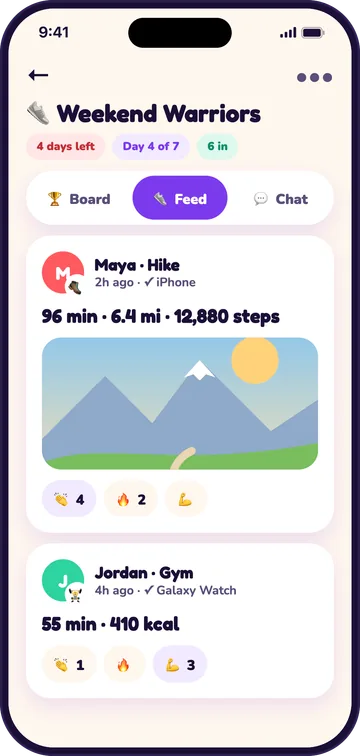
These fixes shaped how we built Jolt Club, our walking challenge app: steps sync automatically from Apple Health or Health Connect, a nightly sweep finalises each person’s day in their own time zone even if they never open the app, past days can be added by hand and are marked, and there’s a chat with cheers for every walk. Challenges are invite-only, and we never share your health data with anyone outside the challenges you join (see our privacy policy).
Frequently asked questions
How many people should be in a walking challenge with friends?
Three to eight is the sweet spot. Fewer than three and there’s no real leaderboard; much more than eight and people stop noticing each other. If you have a big friend group, split it into two teams and score by average per person so the teams stay balanced.
Can iPhone and Android users be in the same walking challenge?
Yes, as long as the tracker reads from both Apple Health and Health Connect. Built-in competitions from a single watch maker usually only work between people on the same platform, so a mixed group is better served by a cross-platform challenge app or a shared spreadsheet.
Do you need a smartwatch for a walking challenge?
No. iPhones count steps on their own, and many Android phones do too through their health app. A watch counts steps you take while your phone is on a desk, so people with watches may score a little higher. Active-minutes scoring or minimum-day goals soften that gap.
What if a friend can’t walk much?
Change the metric, not the person. Score active minutes or workouts so swimming, cycling, wheelchair pushes or chair workouts recorded by a device count too, or set a personal target per person and count days on target. Keep the challenge about showing up rather than raw totals.
How long should our first walking challenge be?
One week. It’s short enough that everyone stays interested and long enough for a comeback. If the group enjoys it, try 14 days next, then 30. Starting long is the most common reason first challenges fizzle out in the second week.
Sources
- World Health Organization, Physical activity fact sheet, accessed November 14, 2026.
- Centers for Disease Control and Prevention, Adult Activity: An Overview (physical activity guidelines for adults), accessed November 14, 2026.
- Jolt Club team, review of 511 two- and three-star US App Store reviews of 10 step and challenge apps, read November 10, 2026 (internal research, unpublished).

Jolt Club team, VirtualBeans LLC makes Jolt Club, a free app for step, walking and workout challenges with friends. We build and test the app ourselves and write these guides from what we learn running challenges. Jolt Club is our product, so we have a stake in it. Spotted an error? Email [email protected].